
Maintenance Schedules
Proactive maintenance scheduling prevents unexpected breakdowns, extends equipment life, and keeps warranties intact. In the console, each equipment record carries its own maintenance schedules, and a fleet-wide dashboard rolls up what is overdue, upcoming, and recently completed.
Quick Start: Create a Maintenance Schedule
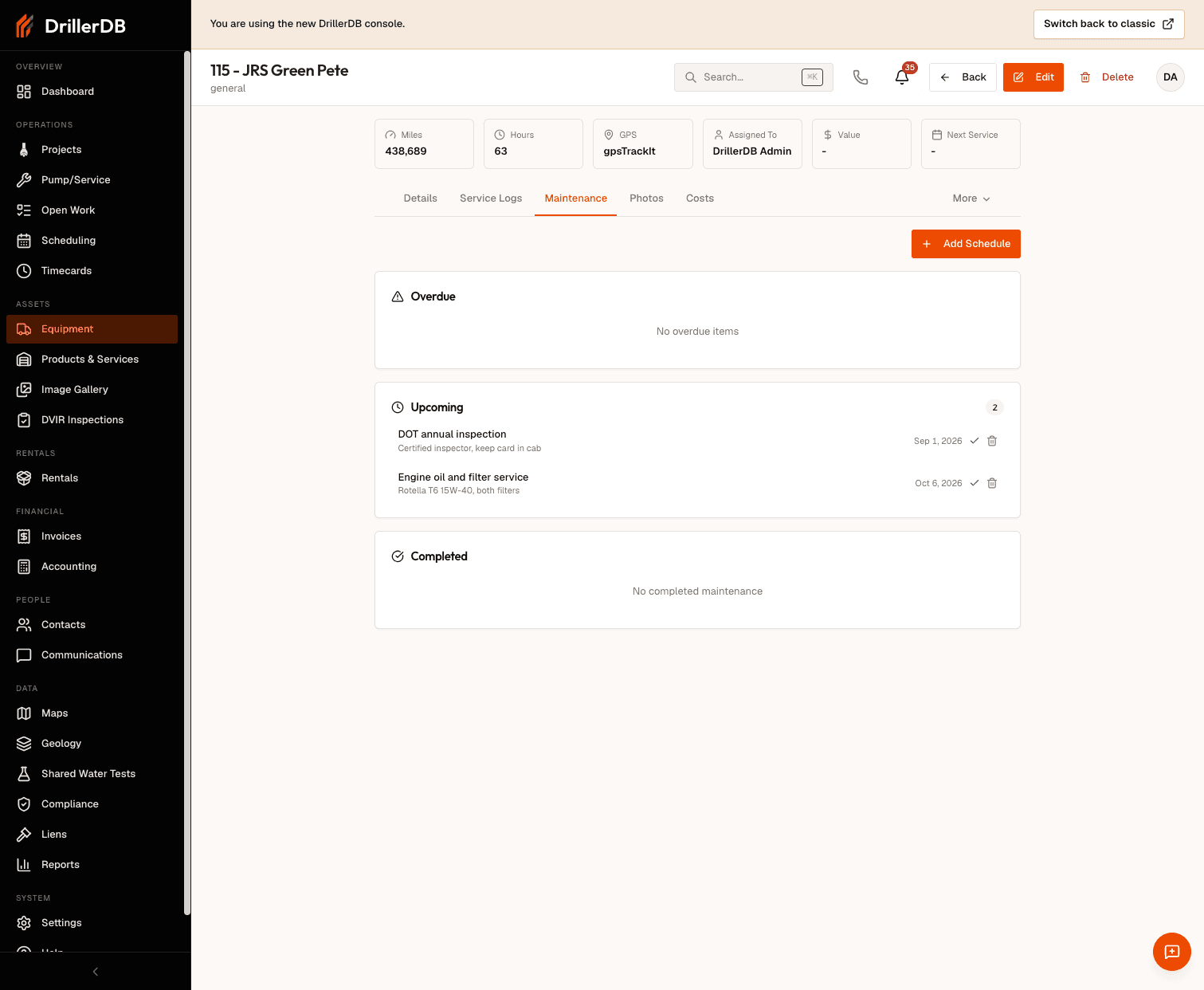
- Open Equipment from the sidebar and click an item
- Go to the Maintenance tab
- Click Add Schedule
- Enter a Task Name and a Due Date
- Optionally set an Interval and Notes
- Save the schedule
Step-by-Step: Setting Up a Maintenance Schedule
Step 1: Open the Maintenance Tab
- Click Equipment in the sidebar
- Find and click the equipment item
- Select the Maintenance tab
Step 2: Add a Schedule
Click Add Schedule and fill in the form. It has four fields:
| Field | Required | Description | Example |
|---|---|---|---|
| Task Name | Yes | What the service is | Oil Change |
| Due Date | Yes | When it is next due | 08/15/2026 |
| Interval | No | How often it recurs - a number plus a unit | 250 |
| Notes | No | Any detail worth recording | Change oil and filter |
The Interval unit is one of days, miles, or hours. Pick the unit that matches how the task comes due - calendar time (days), odometer (miles), or engine time (hours).
Set the Due Date to the next time the task should happen. For brand-new equipment, that is usually the first service milestone from the manufacturer's schedule.
Common Maintenance Tasks
These are typical tasks to schedule. Enter each as its own schedule with an interval in days, miles, or hours.
For Drill Rigs
| Task | Suggested Interval |
|---|---|
| Engine Oil Change | 250 hours |
| Hydraulic Filter | 500 hours |
| Greasing | 50 hours |
| Annual Inspection | 365 days |
For Service Vehicles
| Task | Suggested Interval |
|---|---|
| Oil Change | 5,000 miles |
| Tire Rotation | 7,500 miles |
| Brake Inspection | 180 days |
| DOT Inspection | 365 days |
For Pumps
| Task | Suggested Interval |
|---|---|
| Impeller Inspection | 500 hours |
| Seal Check | 250 hours |
| Motor Service | 1,000 hours |
Managing Multiple Schedules
Each equipment item can have several schedules, tracked independently:
- View all of an item's schedules on its Maintenance tab
- See service across the whole fleet on the Maintenance Dashboard at Equipment > Maintenance, which groups items into Overdue, Upcoming, and Completed
Completing and Editing Schedules
Mark a Schedule Complete
When the work is done, click Complete on the schedule. It moves to the completed group on the Maintenance Dashboard.
Delete a Schedule
- Open the schedule on the Maintenance tab
- Click Delete and confirm
Viewing Maintenance Status
Use the Maintenance Dashboard (Equipment > Maintenance) to see, across all equipment:
- Overdue - past the due date
- Upcoming - due soon
- Completed - recently finished
Open any item from the dashboard to jump to its Maintenance tab.
Best Practices
Start with Manufacturer Specs Use OEM recommendations as your baseline interval, then adjust based on real conditions.
Be Consistent Use the same task names across similar equipment for cleaner reporting.
Keep Due Dates Current When you complete work outside the console, update the schedule's due date so the dashboard stays accurate.
Review Regularly Check the Maintenance Dashboard on a routine cadence to catch overdue items early.
Troubleshooting
Schedule not showing as due?
- Confirm the Due Date is set correctly
- Check the Maintenance Dashboard's Overdue and Upcoming groups
Interval not behaving as expected?
- Make sure the number and unit (days / miles / hours) match how the task actually comes due
Completed work not reflected?
- Use the schedule's Complete action, or update the Due Date for the next cycle
Related Topics
- Service Logs - Record completed maintenance
- Overdue Maintenance - Manage past-due items
- Equipment Costs - Track maintenance expenses
- DVIR Reports - Daily vehicle inspections