
Customer History
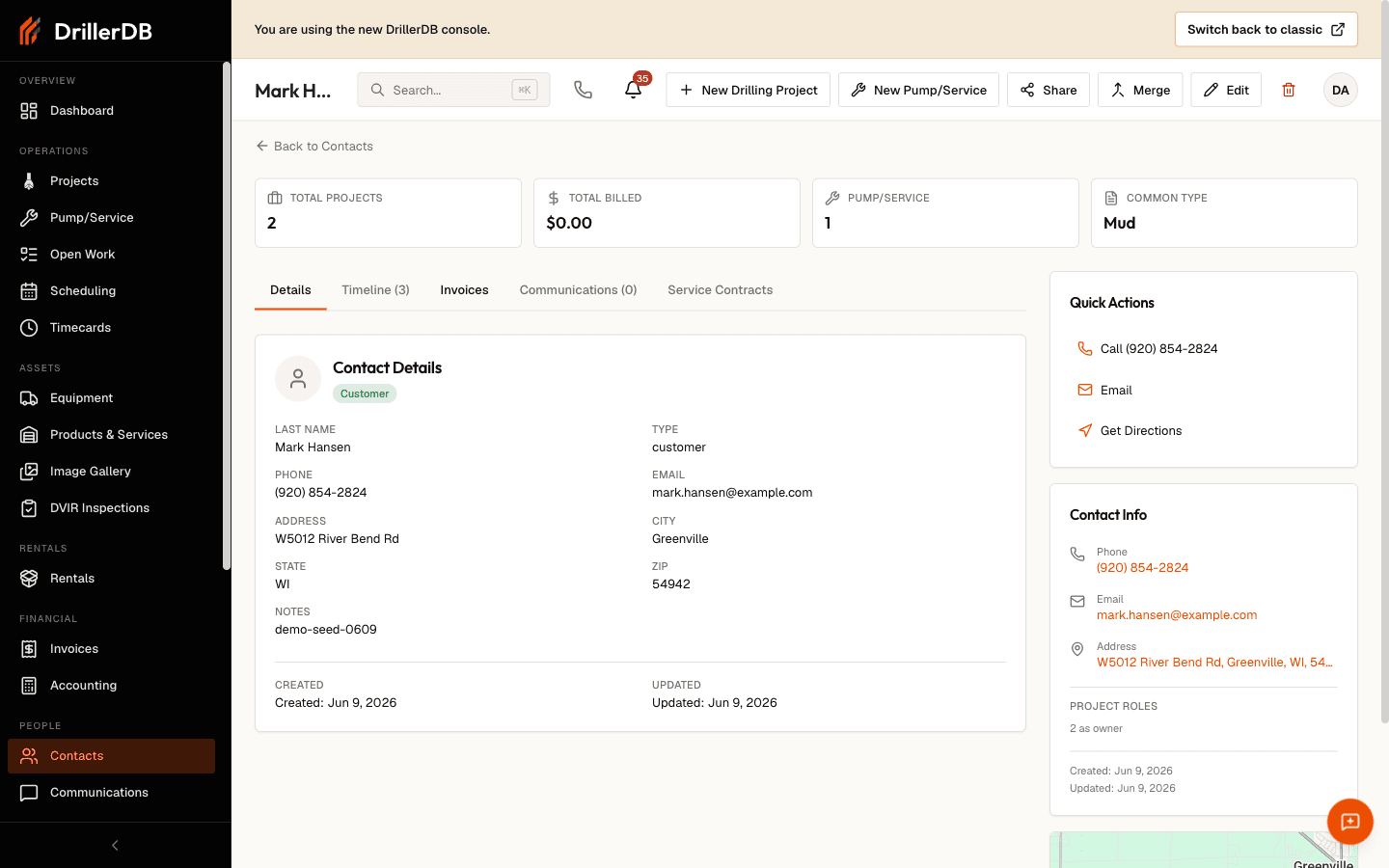
The contact detail page is a complete view of your relationship with each contact - projects, billing, and every logged communication in one place. Use it to answer questions fast and make informed decisions.
Quick Start: View a Contact's History
- Open Contacts from the sidebar
- Search or scroll to the contact
- Click the row to open the detail page
- Use the tabs to move between Details, Timeline, Invoices, Communications, and Service Contracts
The Stats Bar
Across the top of the detail page, four cards summarize the relationship at a glance:
| Card | Shows |
|---|---|
| Total Projects | Drilling projects linked to this contact |
| Total Billed | Lifetime invoiced amount |
| Pump/Service | Count of pump and service work orders |
| Common Type | The contact's most frequent project type |
Details Tab
The Details tab shows the full contact profile - name, company, phones, emails, address, website, and notes - plus badges for the contact Type and any Owner, Builder, or Pump Installer roles. Click Edit to change any field, add additional contacts, or update tax settings.
The Notes field is a single free-text area edited through Edit. For a running record of calls, emails, and meetings, use the Communications tab instead.
Timeline Tab
The Timeline tab combines everything the contact is attached to:
- Linked Projects - each drilling project with its status, address, and date, plus a breakdown of how many projects the contact is on as owner, builder, or pump installer
- Activity Timeline - projects and pump/service work orders together in one list
What You Can Do
| Action | How |
|---|---|
| Open a project | Click any project or timeline row |
| Filter a long timeline | Use the filter box (appears for busy contacts) |
| See role breakdown | Read the summary under Linked Projects |
When a customer calls about past work, open their Timeline to find the specific project, its status, and its date without asking them to look anything up.
Invoices Tab
The Invoices tab lists every invoice billed to the contact, with totals for amount billed and amount still outstanding.
| Column | Description |
|---|---|
| Invoice # | Opens the invoice |
| Date | Invoice date |
| Project | The linked project, if any |
| Total | Invoice total |
| Balance | Amount still owed |
| Status | Paid, Overdue, Partial, Void, or current |
For business accounts the billing contact is often different from the project contact. Set a Billing Email on the Edit screen so invoices reach the right person.
Communications Tab
The Communications tab is the running history of every interaction, and where you start new ones:
| Action | Button |
|---|---|
| Send an email | Send Email |
| Send a text | Send SMS |
| Log a phone call | Log Call |
| Log a meeting | Log Meeting |
Each entry shows who did it, when, and any notes. Email and SMS buttons stay disabled until the contact has an email or phone number on file.
What to Capture
| Type | Example |
|---|---|
| Phone calls | "1/15 - Discussed timeline, prefers morning work" |
| Meetings | "Walkthrough, agreed on well location" |
| Follow-ups | Set a follow-up date when logging a call |
Service Contracts Tab
The Service Contracts tab tracks recurring maintenance for the contact - for example an annual pump service.
- Click Add Contract
- Enter a service name, interval (in months), cost, billing method, and start date
- Save
From each contract you can Record Service, Pause, Resume, Edit, or Cancel it, and the next due date updates automatically.
Quick Info Sidebar
On desktop, a sidebar keeps the essentials one click away:
- Quick Actions - call, email, get directions, or visit the website
- Contact Info - phones, emails, billing email, address, coordinates, and website
- Map - a map preview of the address (when coordinates are available)
Header Actions
From the top of the detail page you can also:
| Button | Action |
|---|---|
| New Drilling Project | Start a project pre-filled with this contact |
| New Pump/Service | Start a work order for this contact |
| Share | Copy a link to the contact |
| Merge | Combine a duplicate into this contact (admins) |
| Edit | Change contact details |
Troubleshooting
Can't find a contact's project history?
- Confirm you opened the right contact
- The project may be linked to a different contact - search by project address
Invoices tab looks empty?
- The contact may have no invoices yet
- If you see a load error, click Retry - an error is not the same as "no invoices"
Communications empty?
- Nothing has been logged yet - start with Send Email, Send SMS, Log Call, or Log Meeting
Map not showing?
- The address may not have coordinates yet - open Edit and confirm the address
Related Topics
- Contacts Overview - Navigate the contact database
- Adding Contacts - Create new contacts
- Contact Types - Types and roles
- Creating Invoices - Bill contacts
- Creating Projects - Start new projects