
Contacts Overview
Contacts is DrillerDB's central contact database - a single place for everyone you work with: property owners, builders, pump installers, vendors, and subcontractors. Use it to find, add, and manage contact records across your whole operation.
Quick Start: Find a Contact
- Click Contacts in the sidebar
- Type a name, phone, email, or address in the search bar
- Click a row to open the contact
Opening Contacts
- Click Contacts in the sidebar (under the People group)
- Your contact list loads, 100 records per page
- Use the pagination controls at the bottom to move between pages
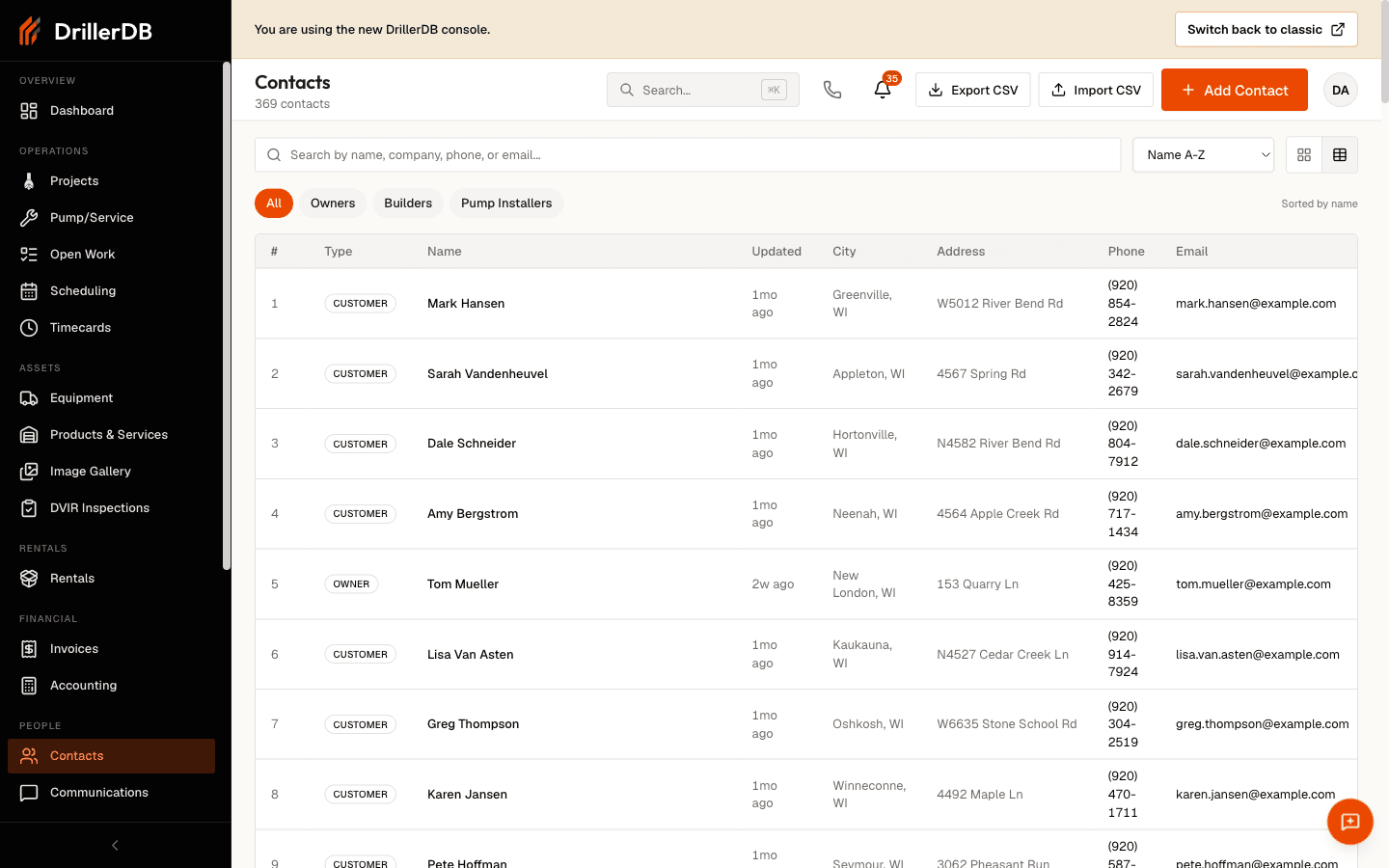
The header also has three quick actions: Add Contact, Import (CSV), and Export CSV.
Searching
How to Search
- Click the search bar at the top of the list
- Type at least two characters
- Results filter automatically as you type (after a short delay)
What You Can Search
| Field | Examples |
|---|---|
| Name | "Smith", "John" |
| Company | "ABC Construction" |
| Address | "123 Main", "Elm Street" |
| City | "Madison", "Milwaukee" |
| Phone | "555-1234", "5551234" |
| "john@email.com" |
One search box covers all of the fields above at once. Typing a phone number matches whether it lives in the primary or cell field.
Sorting
Use the Sort dropdown above the list:
| Sort Option | Best For |
|---|---|
| Name A-Z | Finding someone by name (default) |
| Recently updated | Seeing contacts changed most recently |
Your choice is remembered the next time you open Contacts.
Card and Table Views
Toggle between two layouts with the view switch next to the sort dropdown:
| View | Best For |
|---|---|
| Cards | Scanning contacts on a phone or tablet |
| Table | Comparing many contacts by column on desktop |
The table view shows these columns:
| Column | Description |
|---|---|
| # | Row number on the current page |
| Type | Owner, Builder, Pump Installer, Customer, Vendor, or Sub |
| Name | Person or company name |
| Updated | How recently the record changed |
| City | City and state |
| Address | Street address |
| Phone | Primary or cell phone |
| Primary email address |
Your view choice is remembered between visits.
Filtering by Role
Use the filter chips below the search bar to narrow the list by role:
| Filter | Shows |
|---|---|
| All | Every contact |
| Owners | Contacts flagged as project owners |
| Builders | Contacts flagged as builders or contractors |
| Pump Installers | Contacts flagged as pump installers |
See Contact Types for how these roles are set.
Opening a Contact
- Find the contact in the list
- Click anywhere on the row (or the name)
- The contact detail page opens with projects, invoices, communications, and more
Pagination
The list loads 100 contacts per page. Use Previous and Next at the bottom to page through larger databases; the footer shows the current page and total page count. Searching or filtering resets you to the first page of matching results.
Troubleshooting
Search not finding results?
- Enter at least two characters
- Try partial matches (e.g., "smith" instead of "John Smith")
- Try the phone number without dashes
- Check spelling
Wrong contacts appearing?
- Set the role filter back to "All"
- Clear the search bar
Can't see a contact you just added?
- Clear any active search or filter
- New contacts open on their own detail page right after you save them
Related Topics
- Adding Contacts - Create new contacts
- Contact Types - Types and roles
- Customer History - Projects, invoices, and communications
- Consolidating Duplicates - Merge duplicate records