
Equipment List
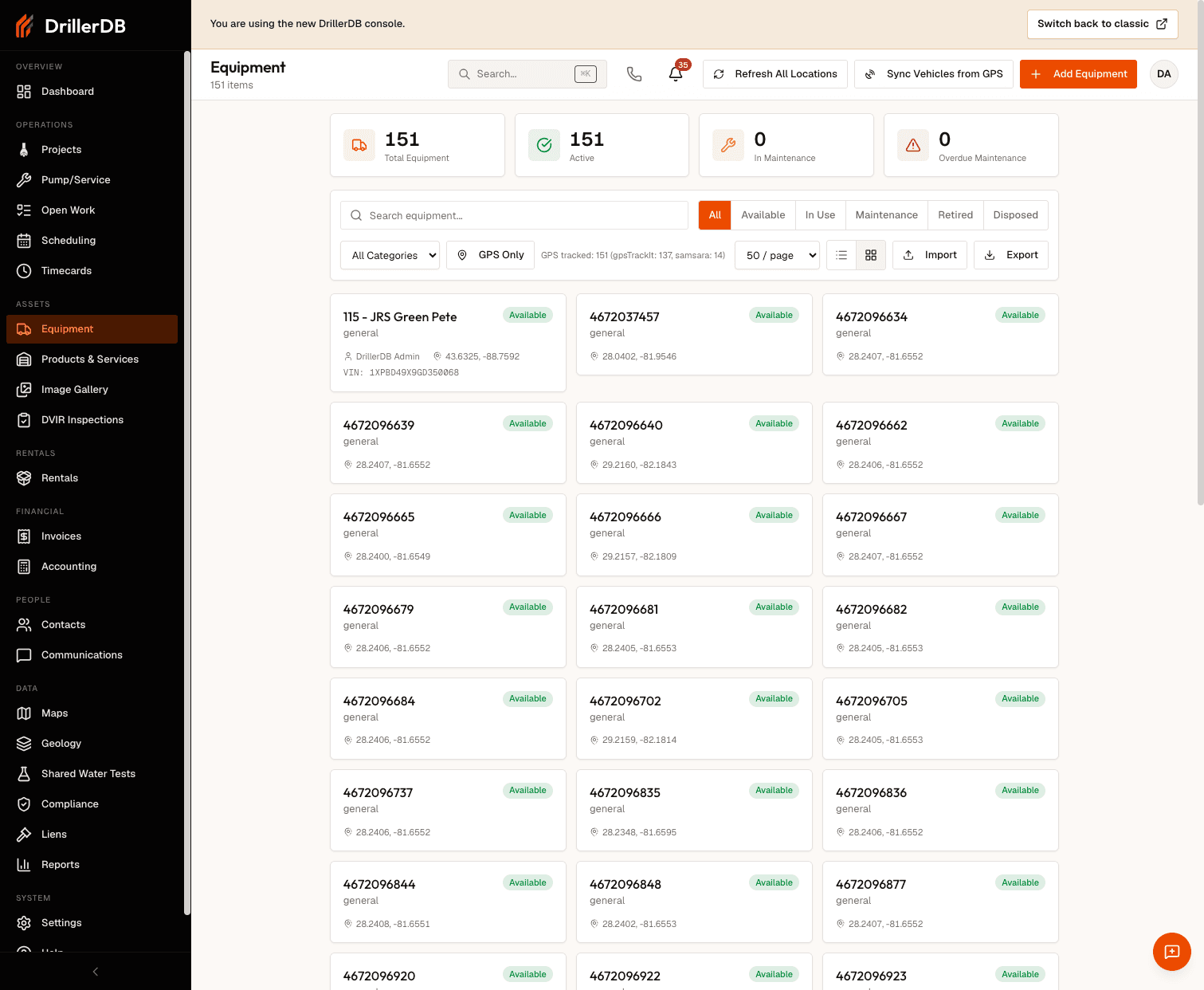
The equipment list provides a complete view of your entire fleet, from drilling rigs to support vehicles and tools. This central inventory helps you track availability, maintenance status, and equipment assignments across all your operations.
Quick Start: View Equipment
- Click Equipment from the sidebar
- View complete equipment inventory
- Use filters to narrow list
- Click any item for details
- Use quick actions for common tasks
Viewing Your Equipment
Navigate to Equipment from the sidebar to see your complete equipment inventory.
Information Displayed
| Column | Shows |
|---|---|
| Equipment name | Identifier you assigned |
| Type | Category (rig, truck, etc.) |
| Make/Model/Year | Manufacturer details |
| Status | Available, In Use, Maintenance |
| Assignment | Current location or project |
| Last maintenance | Most recent service date |
| Next due | Upcoming maintenance dates |
Filtering Equipment
Use the filter options at the top of the list to narrow down your view.
Filter Options
| Filter | Purpose | Use Case |
|---|---|---|
| By Type | Equipment categories | Focus on drilling rigs, trucks, or tools |
| By Status | Availability status | Find available equipment for planning |
| By Location | Yard or project site | See what's at each location |
| By Maintenance | Service status | View overdue or upcoming maintenance |
Step-by-Step: Filter Equipment
- Click filter dropdown
- Select filter type (Type, Status, Location, or Maintenance)
- Choose values to filter by
- List updates immediately
- Click Clear Filters to reset
Combine multiple filters to find exactly what you need. For example, filter by "Available" status AND "Drilling Rig" type to find available rigs.
Sorting Options
Click column headers to sort your equipment list by different criteria.
Sortable Columns
| Column | Sort By |
|---|---|
| Name | Alphabetical (A-Z or Z-A) |
| Type | Grouped by category |
| Status | Grouped by availability |
| Last service | Most or least recent |
| Next due | Soonest first |
Quick Actions
Each equipment entry includes quick action buttons for common tasks.
Available Actions
| Action | Description |
|---|---|
| View details | Open full equipment record |
| Add service log | Record maintenance or repair |
| Update schedule | Modify maintenance intervals |
| Change status | Update availability |
| Assign | Link to project or employee |
| QR code | Generate tracking code |
Step-by-Step: Use Quick Actions
- Find equipment in list
- Click action button on the row
- Complete the action form
- Save changes
- List updates automatically
Search Functionality
The search bar at the top allows you to quickly locate specific equipment.
Searchable Fields
| Field | Example |
|---|---|
| Equipment name | "Drilling Rig 1" |
| Make/Model | "Schramm", "T685" |
| Serial number | "SN12345678" |
| VIN | Vehicle ID |
| License plate | Registration number |
For large fleets with dozens or hundreds of pieces of equipment, search is the fastest way to find a specific item.
Exporting Data
Export your equipment list for external use.
Export Options
| Format | Use Case |
|---|---|
| CSV | Spreadsheet analysis, data import |
| Reports, insurance documentation |
Step-by-Step: Export Equipment List
- Apply desired filters (optional)
- Click Export button
- Choose format (CSV or PDF)
- File downloads with visible columns
- Use for reporting or sharing
Troubleshooting
Equipment not appearing in list?
- Check filter settings
- Verify equipment status isn't set to "Retired"
- Use search to locate by name or serial
Can't find specific equipment?
- Use search bar with any identifying info
- Clear all filters first
- Check for spelling variations
Quick actions not working?
- Ensure you have proper permissions
- Try refreshing the page
- Check if equipment is locked by another user
Export missing equipment?
- Export only includes filtered results
- Clear filters to export entire list
- Check column visibility settings
Related Topics
- Adding Equipment - Create new records
- Service Logs - Record maintenance
- Equipment Assignment - Assign to employees
- Maintenance Schedules - Set up schedules