
Project Details
The project detail page is your central hub for managing all aspects of a drilling project. This guide walks you through each tab and feature.
Quick Start: Navigate Project Details
- Go to Projects in sidebar
- Click any project to open details
- Use tabs to access different information
- Click Save after making changes
Understanding the Interface
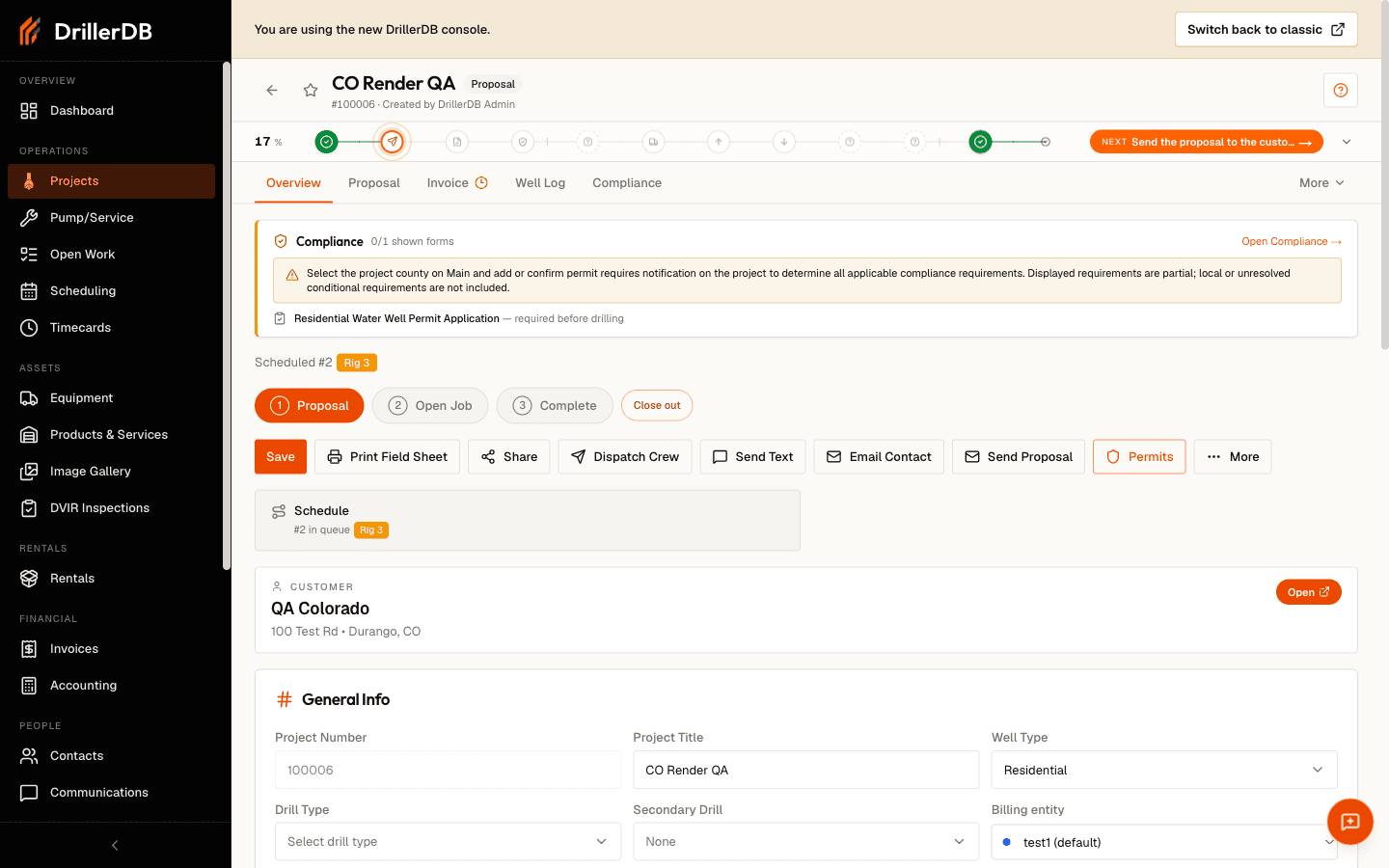
Project Header
The header appears at the top of every project and shows:
| Element | Description |
|---|---|
| Project ID | Unique numeric identifier (e.g., 12345) |
| Status Badge | Color-coded current status |
| Customer Name | Quick reference badge |
| Action Buttons | Save, Send, Schedule, etc. |
Status Color Coding
| Color | Status | Meaning |
|---|---|---|
| Gray | Proposal | Quote not yet approved |
| Yellow | Open Job | Approved, ready to schedule |
| Green | Complete | Work finished |
| Red | Closed | Archived, no further action |
Tab-by-Tab Guide
Overview Tab
The Overview tab displays core project information.
Customer Section:
- Customer name (linked to Contacts)
- Phone and email
- Billing address
Location Section:
- Job site address
- City, State, ZIP
- County (for permits)
- GPS coordinates
Project Details:
- Well type (Residential, Commercial, etc.)
- Drilling method
- Estimated depth
- Special requirements
Scheduling Section:
- Assigned team
- Scheduled dates
- Lead driller
- Equipment assigned
Click the customer name to jump directly to their Contacts record.
Proposal Tab
Build and manage project pricing.
Step-by-Step: Add Line Items
- Click Add Line Item
- Select from your saved items or create custom
- Enter quantity
- Adjust price if needed
- Repeat for all items
- Click Save
Line Item Categories:
| Category | Examples |
|---|---|
| Drilling | Per-foot drilling charges |
| Casing | PVC, steel casing materials |
| Materials | Grout, bentonite, sand |
| Permits | State fees, county fees |
| Equipment | Pump, pressure tank |
| Labor | Installation, testing |
| Mobilization | Setup, travel |
Quick Actions:
- Quick Add: Add multiple items at once
- Duplicate: Copy existing line item
- Reorder: Drag to rearrange items
- Delete: Remove unwanted items
Invoice Tab
Manage billing after project completion.
Invoice Features:
- Generate invoice from approved proposal
- Track payment status
- Record partial payments
- Send payment reminders
- View payment history
Step-by-Step: Create Invoice
- Complete the project work
- Go to Invoice tab
- Click Generate Invoice
- Review line items (pulled from proposal)
- Set payment terms
- Click Send Invoice
Site Tab
Document site conditions and photos.
Site Information:
- Access directions
- Gate codes
- Property owner contacts
- Parking locations
Photos:
- In the Site Images section, drop photos into the upload box, or click it to choose files from your device.
- Each photo appears with a Delete button and an Add a note... line underneath.
Add or edit a photo caption:
- Under any photo, click Add a note....
- Type a short note about the photo, like what it shows or where it was taken.
- Press Enter, or click anywhere outside the box, to save. Press Esc to cancel.
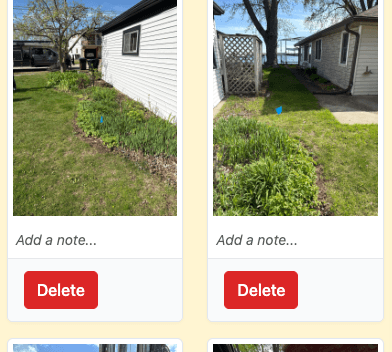
- To change a caption later, click it again and edit the text.
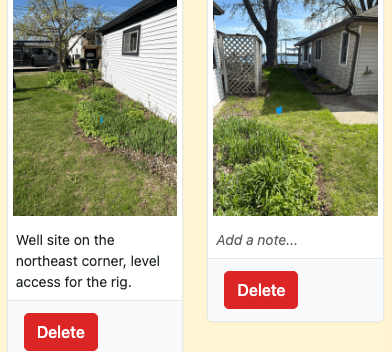
Photo captions also print under each photo on the job completion email your customer receives. Write them for the customer to read, not just as notes to yourself. A caption like "Well site on the northeast corner" tells the customer exactly what they are looking at.
Site Notes:
- Document conditions before work
- Record obstacles encountered
- Note any customer preferences
Hazards Tab
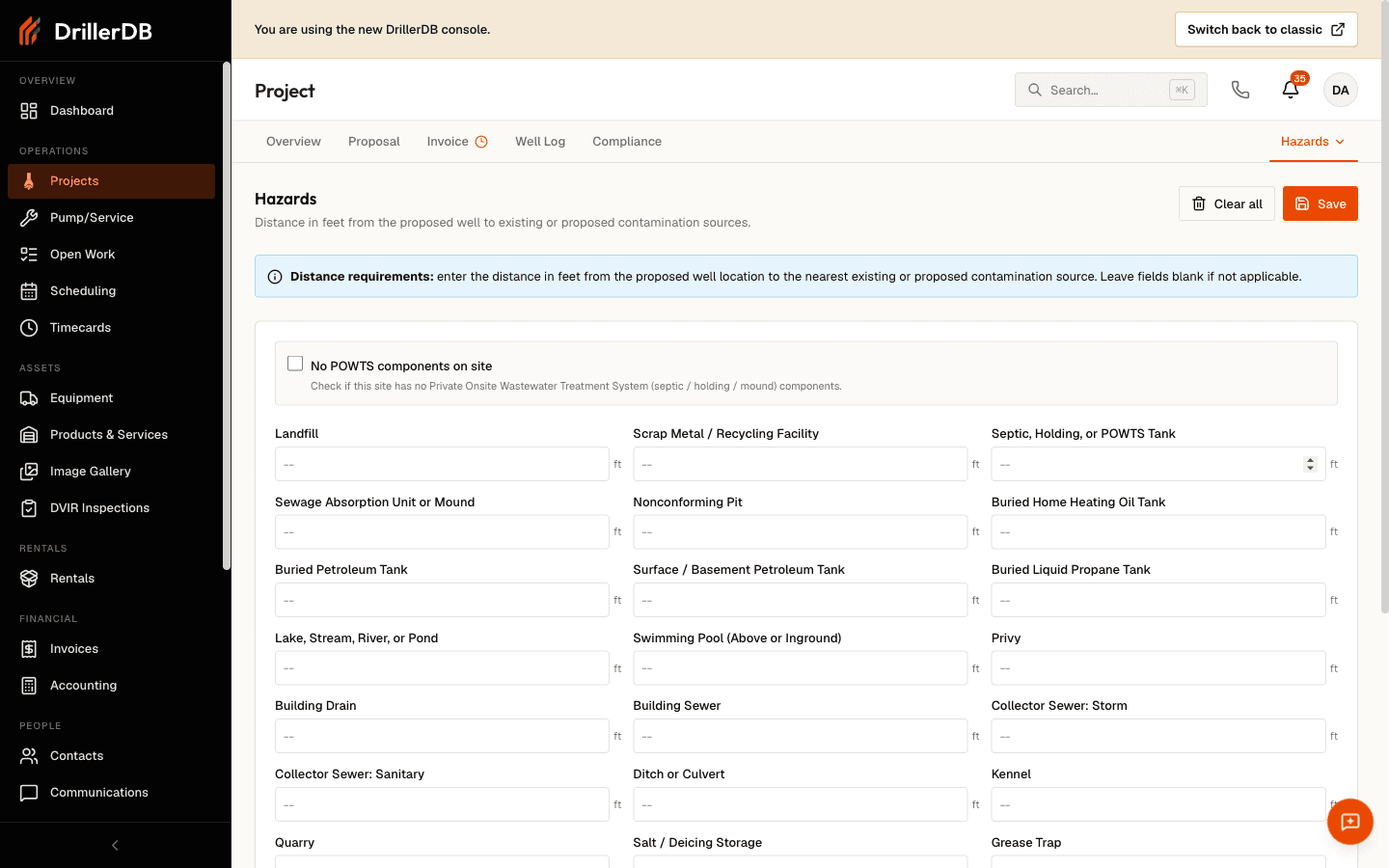
Records the distance, in feet, from the proposed well to nearby contamination sources - the setbacks needed for permits and compliance.
Step-by-Step: Record Hazard Distances
- Go to the Hazards tab
- Enter the distance in feet to each nearby contamination source (septic, fuel tanks, surface water, and so on)
- Leave a field blank if it doesn't apply
- Check No POWTS components on site if the site has no septic, holding, or mound system
- Click Save
DrillerDB flags any distance below a typical 25 ft setback so you can double-check it before submitting a permit.
See the Hazards guide for the full list of contamination sources and setback guidance.
Well Log Tab
Record drilling and completion data.
Geology Section:
- Formation layers encountered
- Depths and thicknesses
- Material descriptions
- Water-bearing zones
Casing Section:
- Casing type and diameter
- Set depths
- Grout intervals
Completion Data:
- Total depth drilled
- Static water level
- Yield (GPM)
- Screen placement
Step-by-Step: Enter Well Log
- Go to Well Log tab
- Click Add Formation for each layer
- Enter depth from/to
- Select material type
- Add description
- Mark water-bearing if applicable
- Repeat for all formations
- Complete casing and screen sections
- Click Save
A checkmark appears when the well log is complete.
Activity Tab
View complete audit trail of project changes.
Tracked Events:
- Status changes
- Field updates
- Proposal sends
- Invoice activities
- User edits
Activity Entry Details:
- Who made the change
- When it occurred
- What was modified
- Previous and new values
Working with Projects
Saving Changes
After editing any tab:
- Review your changes
- Click Save button
- Wait for confirmation
- Changes sync immediately
Use Cmd+S (Mac) or Ctrl+S (Windows) as a keyboard shortcut to save.
Advancing Project Status
Step-by-Step: Change Status
- Click current status in header
- Select new status from dropdown
- Confirm the change
- Status updates immediately
Or use the workflow buttons:
- Send Proposal: Moves to Sent status
- Convert to Open Job: After approval
- Mark Complete: When work is done
- Close Project: Final archive
Accessing Related Records
Quick links available from project details:
| Link | Opens |
|---|---|
| Customer Name | Contacts record |
| View on Map | Maps page with pin |
| Permit Status | Permit tracking |
| GPS | Navigation to site |
Step-by-Step: Run a Project Detail QA Check
- Confirm customer, location, and project status are accurate
- Validate proposal and invoice tabs for pricing consistency
- Check site photos, hazards, and notes for field completeness
- Review well log entries and completion fields
- Inspect activity log to verify no critical updates were missed
Additional Tabs
Depending on your configuration, you may see:
Pump Logs Tab
- Pump installation records
- Make/model information
- Serial numbers
- Warranty dates
Daily Reports Tab
- Field crew daily logs
- Time on site
- Work completed
- Issues encountered
DVIR Tab
- Driver Vehicle Inspection Reports
- Pre-trip and post-trip inspections
- Equipment condition records
Lab Results Tab
- Water quality test results
- Bacteria tests
- Mineral analysis
- Compliance documentation
Troubleshooting
Changes not saving?
- Check internet connection
- Verify required fields are complete
- Look for validation errors
- Try refreshing the page
Tab not appearing?
- Some tabs are role-restricted
- Check with administrator
- Tab may only show when data exists
Can't edit fields?
- Project may be closed
- You may lack edit permissions
- Field may be system-generated
Photos not uploading?
- Check the file size. A photo has to be under 25 MB
- Check the file type. Photos go up as JPG, JPEG, PNG, GIF, HEIC, HEIF, or WebP
- A PDF is not a photo here, and the upload box refuses it. Put documents on the Files tab instead
- Try a different browser
Related Topics
- Creating Projects - Start new projects
- Proposals & Line Items - Build quotes
- Project Statuses - Workflow stages
- Well Logs - Completion records