
Dashboard Overview
When you log in to DrillerDB, you land in your workspace. This guide shows you what is on the screen and where to find the things you will use every day.
Quick Start: Get Your Bearings
- Log in at console.drillerdb.com.
- The left menu runs down the left side. It is always there, so you can jump to any part of DrillerDB from any screen.
- The top bar across the top has search, alerts, and your account menu.
- The main area in the middle shows whatever section you are in. When you log in, that is your Dashboard - an overview of your business. Click Projects in the left menu to reach your job list.
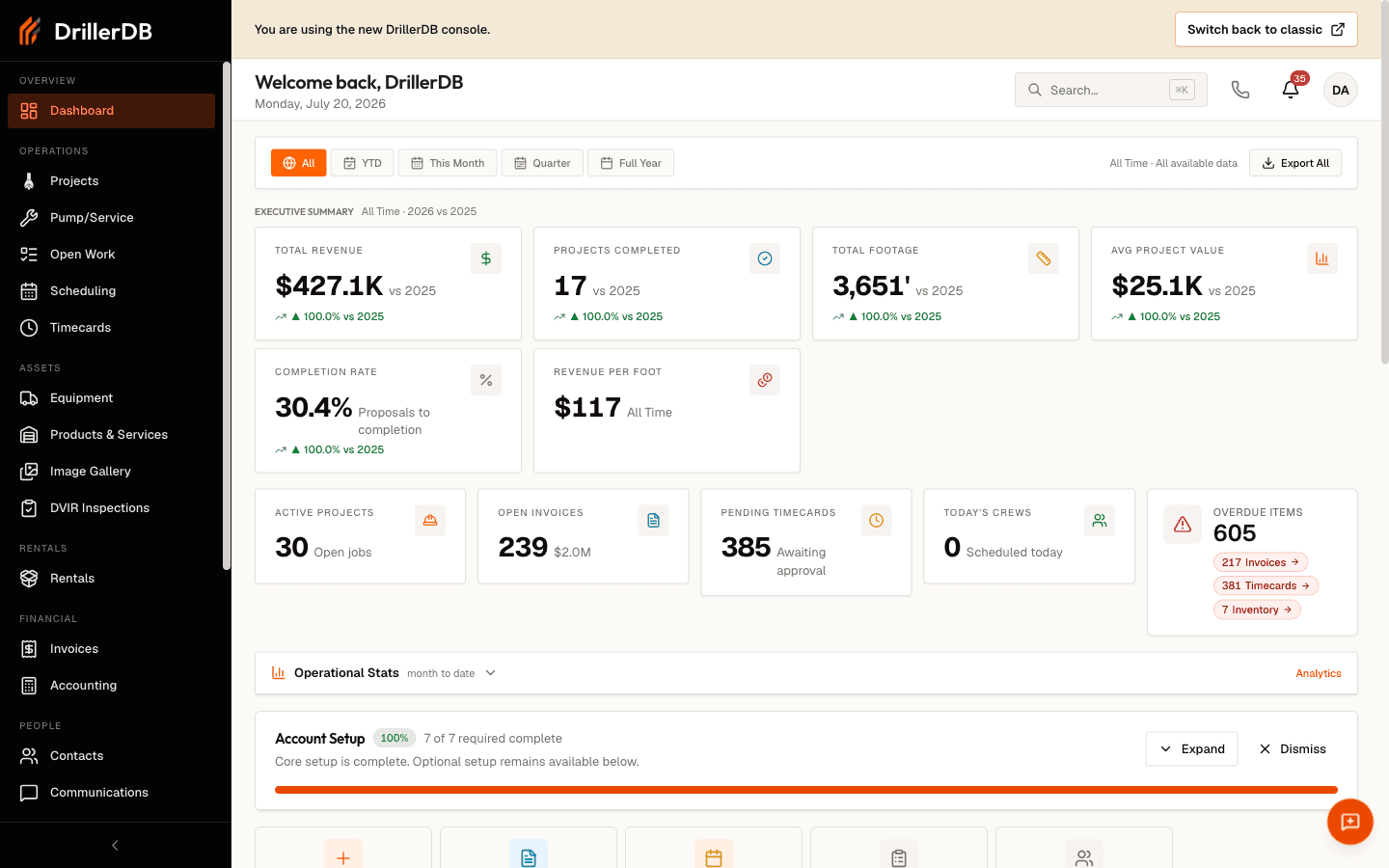
No matter which screen you are on, the left menu is always there. If you are not where you expected to be, click Projects to see your jobs, or click any other section to go straight to it.
The Left Menu
The menu down the left side is how you move around DrillerDB. Here is what each section is for, top to bottom:
| Section | What's there |
|---|---|
| Dashboard | Your at-a-glance overview and key numbers |
| Projects | All your drilling projects and proposals - your main list |
| Pump/Service | Pump and service work orders |
| Open Work | Everything that still needs action |
| Scheduling | Your crews' calendars and the job schedule |
| Timecards | Crew hours and time tracking |
| Equipment | Your rigs and other equipment |
| Products & Services | Your materials and service catalog |
| Invoices | Billing and payment tracking |
| Contacts | Your customer and contact list |
| Communications | Email, text, and call history |
| Maps | Every job on a map (the Job Map) |
| Compliance | State forms and permit paperwork |
| Reports | Business reports and exports |
| Settings | Company setup, users, and preferences |
| Help | Guides and support |
Your menu may show a few more or fewer sections than the list above, depending on which DrillerDB features your company uses. Click the arrow at the top of the menu to collapse it and free up screen space.
The Top Bar
The bar across the top is available from any screen:
| Element | What it does |
|---|---|
| Menu button (top left) | Collapse or open the left menu |
| Search ("Search anything...") | Find any project, customer, or record. Press Cmd+K (Mac) or Ctrl+K (Windows) to jump straight to it |
| Feedback | Send us a note or report a problem |
| Notifications (bell) | Alerts and updates; the number is how many are new |
| Account menu (your name, top right) | Manage your company, change account settings, and Logout |
Your Main List: the Projects List
Click Projects in the left menu to see every job you have.
- The New Project, Import, and Export CSV buttons sit at the top right.
- The All / Proposals / Open Jobs / Complete / Closed / Starred pills filter the list by status.
- A single search box finds projects by well key, address, or contact name. The Filters button opens an advanced panel to narrow by employee, well type, drill type, state, county, priority, and contact.
- Each row shows the job's status, next step, priority, ID, date, client, address, county, and type. Click a row to open that project.
Step-by-Step: Your First 10 Minutes
New to DrillerDB? Start here.
- See your jobs. Click Projects in the left menu. This is your main list. Use the Open Jobs pill to see just your active jobs.
- Open a job. Click any row to open the full project. The proposal, invoice, site info, well log, and more all live in one place.
- Check the schedule. Click Scheduling to see your crews' calendar and the order of upcoming work.
- See the map. Click Maps to view every job on the Job Map and spot what is near you.
- Find anything fast. Click the search box at the top, or press Cmd+K (Mac) or Ctrl+K (Windows), then type a customer name, address, or ID.
- Set up your company. Click Settings to add your team, set preferences, and connect billing.
Start your first project from the New Project button at the top of the Projects list. See Create Your First Project for a full walkthrough.
Troubleshooting
The page will not load?
- Check your internet connection
- Refresh the page
- Try a different browser
Landed on a screen you did not expect?
- The left menu is always there. Click Dashboard for your overview, or Projects to get back to your job list.
Related Topics
- Navigation Basics - Detailed navigation guide
- Global Search - Search features
- Create Your First Project - Start a new project
- Projects - Project management