Chat with us, powered by LiveChat
NewSee the ground in 3DLook

Your operations on the wall. Your team on the same page.

A screen in the shop with a live map of the day on it: every crew, every rig and every job, each one carrying its status. It refreshes every 30 seconds, so nobody has to open a laptop to answer "where are we today".

$249 per player, plus $79 per screen each month.

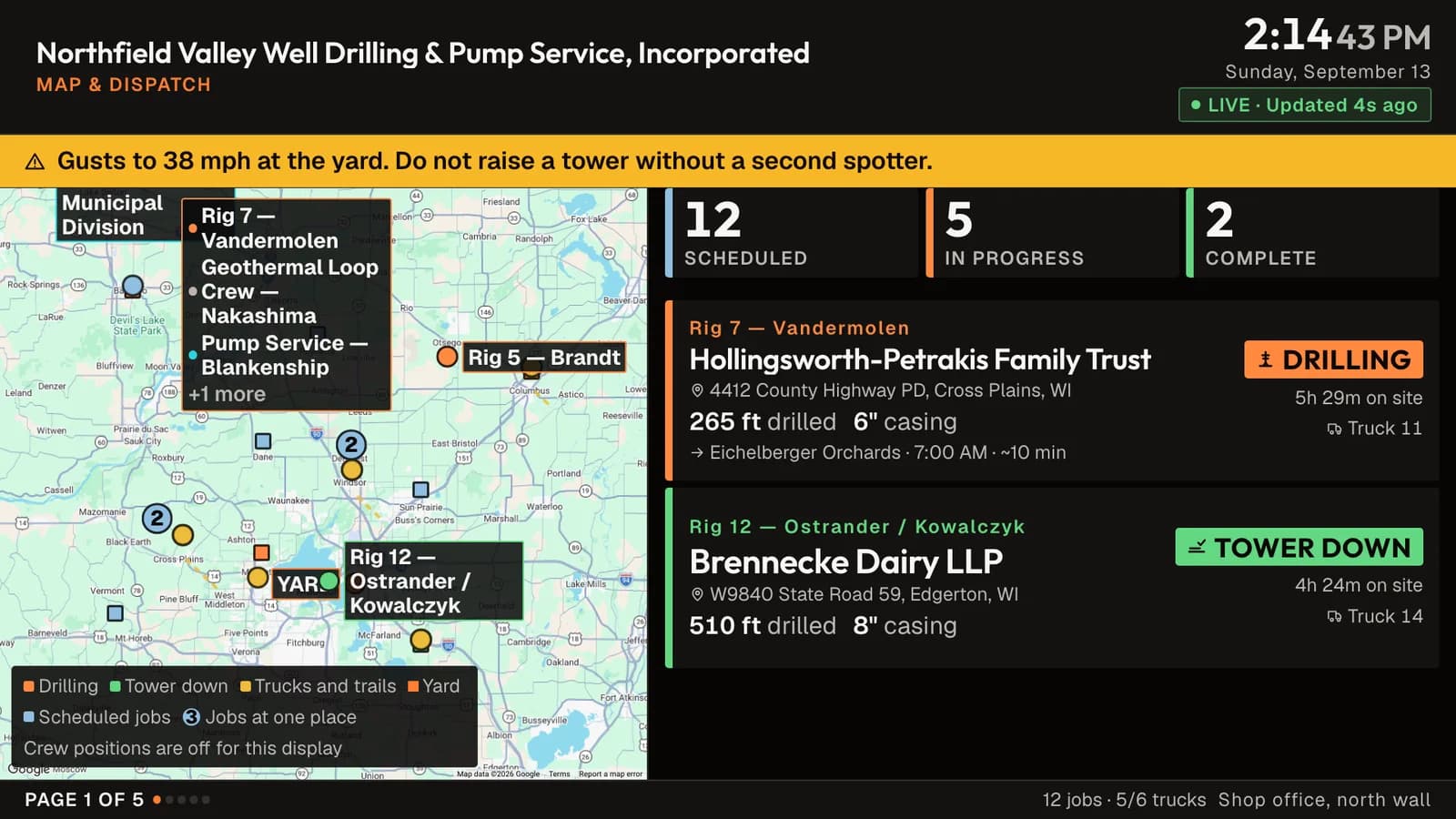
The Map and Dispatch board on a wall screen: a live map of the territory with crew, rig and job pins in their status colors, and crew rows beside it naming the customer, the address, the status and the next job.

Map and Dispatch, on a 1080p screen. The company, crews and customers on these screenshots are demo data.

What goes on the screen

Three boards come with the player. Put one on a screen and leave it, or rotate through them on an interval you choose. The board is set from your desk, never from the screen, so there is nothing on the wall anyone can click by accident.

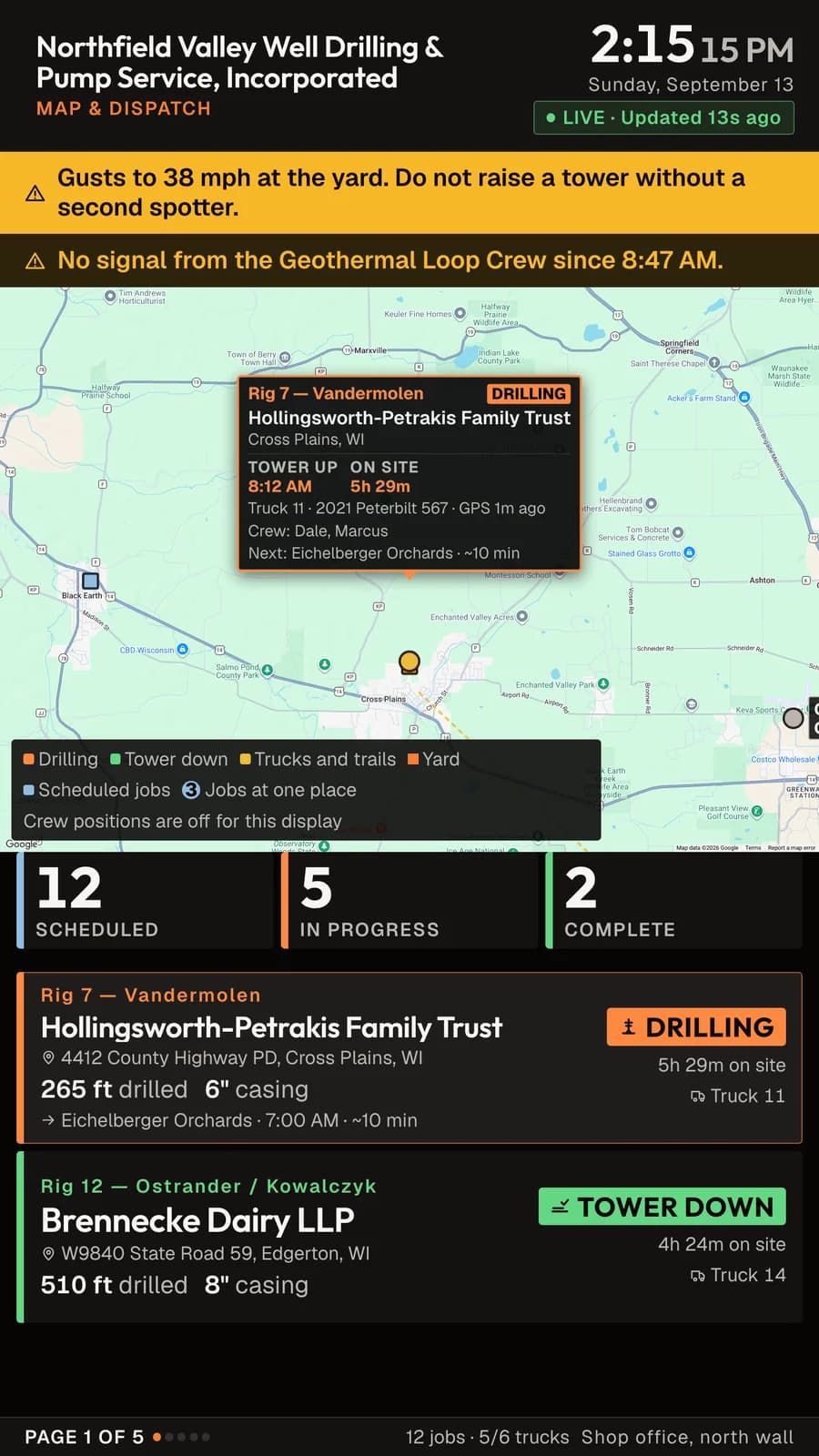
The Map and Dispatch board with the map holding on one crew: a callout naming the rig, the customer, the town, the tower-up time, five and a half hours on site, the truck, the crew, and the next job ten minutes away, with the crew rows underneath.

Map and Dispatch

A live map of the day. Every crew, every rig and every job on one screen, each pin carrying the color of its status, so the shape of the day reads from across the room without anybody asking.

The map does not sit still. It moves from the whole territory to one crew at a time, and that crew's row opens as the map lands on it, so a board with eight crews still gives each one its turn.

Under the map, one row per crew: the customer, the address, whether the tower is up or down, how long they have been on site, the truck, and the next job with the time it is due and an estimated drive to it. That estimate comes from the distance rather than a routing service, so it reads as about ten minutes, not as an exact figure.

Job pins and vehicles show on every screen. Crew positions stay off until somebody with permission to see crew locations turns them on for that specific screen, and the screen records who turned them on.
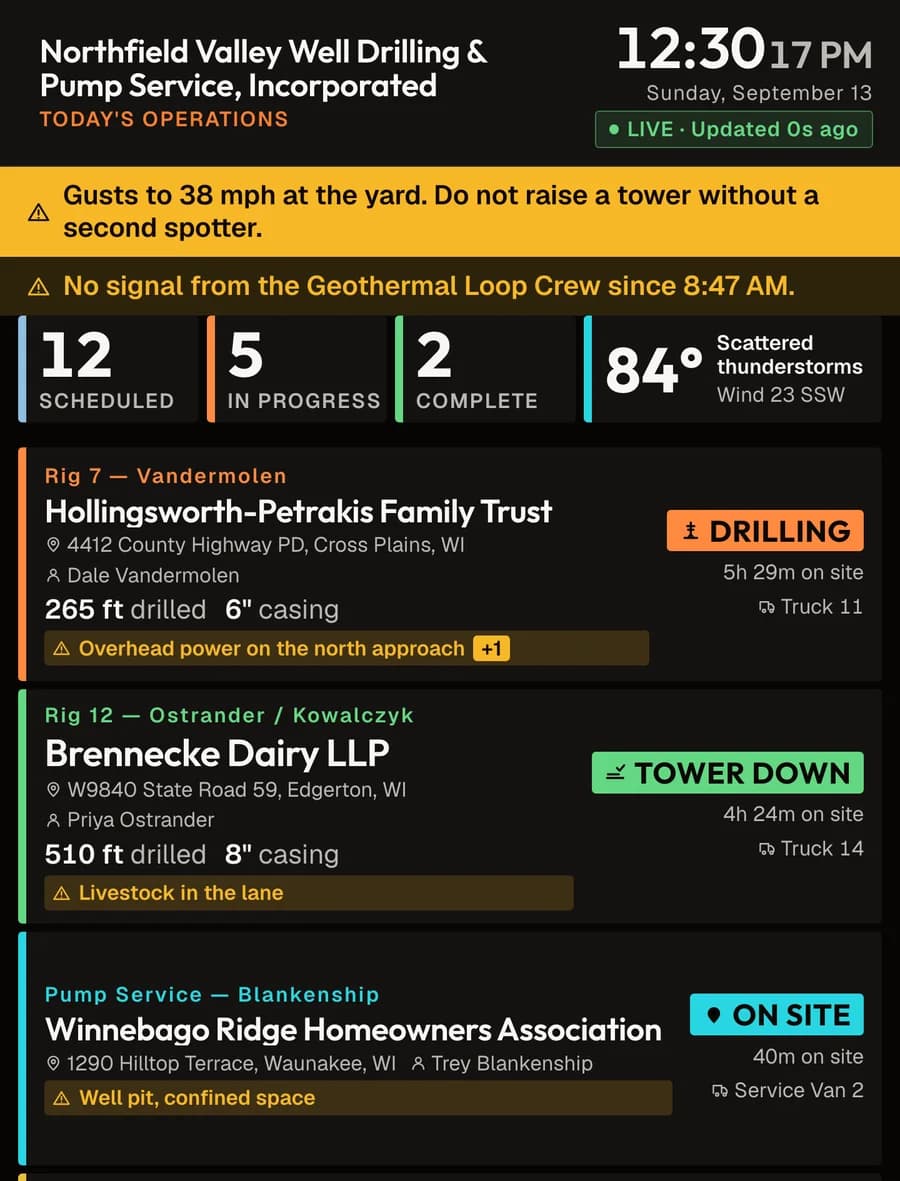
Today's Operations on a portrait screen, showing three crew rows with status chips reading Drilling, Tower down and On site.

Today's Operations

The same crews without the map, so more of them fit. Who is on each one, the customer, the address, the status, and how long they have been on site. Drilling jobs carry the depth and the casing size in the row.

Counts for scheduled, in progress and complete run across the top with the local forecast beside them. A yard advisory, like a wind warning that stops tower work, takes the top strip when there is one.

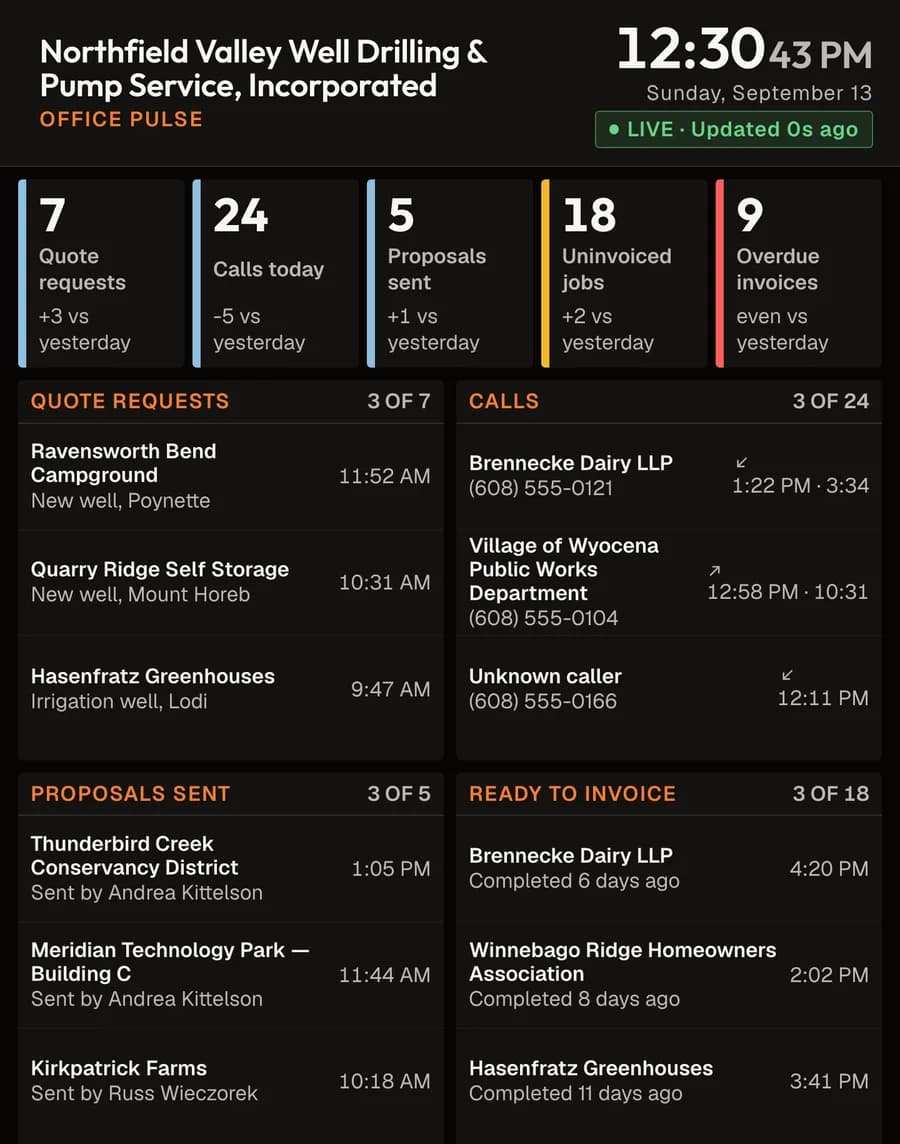
The Office Pulse board: counts for quote requests, calls, proposals sent, uninvoiced jobs and overdue invoices, with the most recent entries listed under each.

Office Pulse

The board for the desk rather than the shop. Quote requests, calls, proposals sent, jobs finished but not yet invoiced, and invoices past due.

Each number carries yesterday's comparison, and the most recent entries sit underneath it, so the work that is waiting has a name on it instead of only a count.

Plug it in, pair it, run it from your desk

No keyboard, no mouse, and nothing to install on the TV.

  1. Plug it in

    HDMI into the TV, USB-C into power. Your Wi-Fi is already on the card, and Ethernet works with no setup at all. On the player in our own office, the board is on screen about 18 seconds after the power goes on, and the DrillerDB mark is up within two.

  2. Pair it

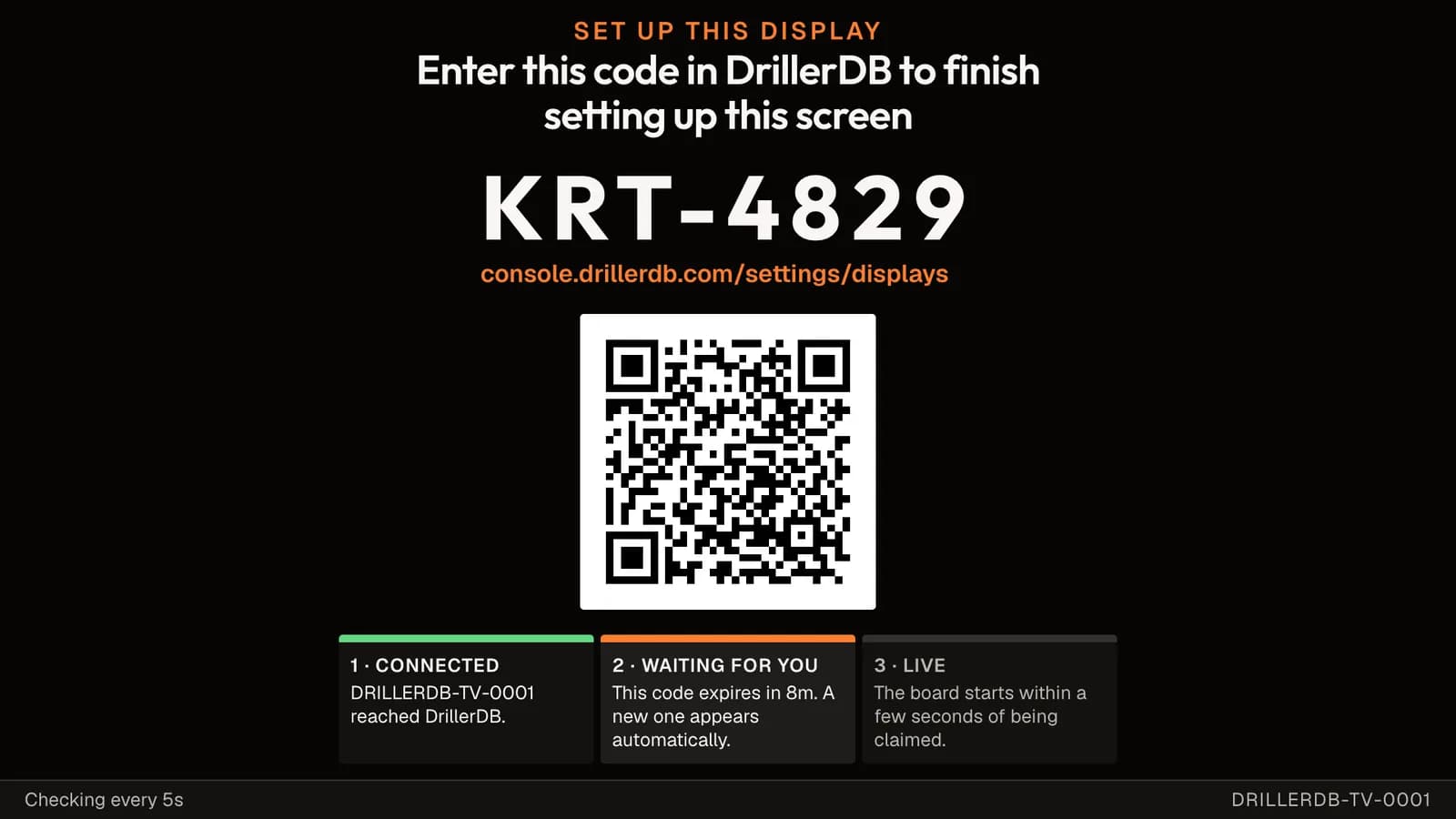
    The screen shows a code like KRT-4829 and a QR code for the same page. Open Settings, then Displays, type the code, and confirm which screen you are binding. The board replaces the code a few seconds later. If a code expires before you get to it, the screen shows a fresh one on its own.

  3. Run it from your desk

    Settings, then Displays lists every screen you own, ordered by which one needs attention. Name a screen for where it hangs. Set its board or its rotation, its orientation, its theme, its time zone and its overnight dimming. Flash a screen when you cannot tell which one is which, or reload it from the browser.

The pairing screen: the heading Enter this code in DrillerDB to finish setting up this screen, a large code reading KRT-4829, the address console.drillerdb.com/settings/displays, a QR code, and three progress cards reading Connected, Waiting for you, and Live.

What a new screen shows until somebody claims it.

The player

A Raspberry Pi 5 in a case, built for a screen that is never turned off. It hides behind the TV on two strips of Dual Lock and needs no tools to mount.

In the box

  • Raspberry Pi 5 with 4GB of memory, in a case with a heat sink and a fan
  • 27W USB-C power supply rated for continuous use
  • Two micro-HDMI to HDMI cables, 6ft
  • 128GB microSD card, written with the DrillerDB image and your Wi-Fi
  • USB-C extension cable, for a TV that is already on the wall
  • Two mounting strips and a quick start card

The TV is not included. Any screen with an HDMI input works, and a screen you already own is the right screen.

Specifications

Output
1080p or 4K, landscape or portrait
Network
Wi-Fi or Ethernet
Storage
128GB microSD, replaceable
Power
27W USB-C
Time to the board
About 18 seconds from power on
Refresh
Every 30 seconds
Warranty
One year

Updates install overnight. The player checks the download against a checksum, keeps the release it was running, and puts it back if the new one fails to report in.

One player per screen, one price per screen

The hardware is a one-time cost and the player is yours. Cancel a screen whenever you want and keep the hardware.

$249 per player, once

$79 per screen, each month

How many screens?

1

$249 today, then $79 a month for 1 screen.

Checkout runs on Stripe. A player needs an active DrillerDB plan on the account it pairs with. Any paid plan works, and you can compare plans. We build each player to order and email you the ship date.

What the price covers

  • The player, built and tested before it ships
  • Your Wi-Fi written onto the card
  • Free shipping in the US
  • One year hardware warranty
  • 30 days to send it back
  • Software updates for as long as the screen is subscribed

Questions about the TV dashboard

Any TV or monitor with an HDMI input. The board sizes its own type to the screen it is on, so a 32 inch screen and a 65 inch screen both read from across a shop. 1080p and 4K both work.
No. Plug in HDMI and power. The screen shows a pairing code and a QR code, and you finish the setup from a phone or any browser signed in to DrillerDB.
Portrait is a first class layout, not a workaround. The board reads the real shape of the screen and lays itself out for it, so a portrait screen gets more crew rows down the page at the same type size. The player in our own office runs a portrait screen. You set the rotation in Settings > Displays.
We write your network name and password onto the card before the player ships, so it joins your network the first time it boots. Ethernet also works and needs no setup at all. If your Wi-Fi changes later, plug in Ethernet or email us and we will send a new card.
The board keeps showing the last data it received and says how old that data is, in words, on screen. Panels fed by a source that has gone quiet are dimmed so nobody reads a stale number as a live one. When the connection comes back the board catches up on its own.
If ten minutes pass with no successful update, the board reloads itself. If the browser process dies, the player restarts it. If a software update fails to check in after it installs, the player rolls back to the release it was running before.
Yes. Each screen needs its own player and its own $79 a month subscription. Screens are independent, so the shop can show Today's Operations while the office shows Office Pulse.
The screen stops updating and says so. The player is yours to keep. Subscribe the screen again and the board comes back.
Yes. The board shows data from your DrillerDB account, so the account it pairs with needs an active paid plan. Any paid plan works. Compare plans.

Put the day on the wall

If you would rather see it running before you buy one, we will walk you through a live board on a call.