
Drill Path Settings
The drill path on a project shows twelve milestones in three stages. Not every drilling company tracks all twelve. Settings > Drill Path is where you turn off the ones you do not use and decide which stage the Permits milestone sits in.
These settings are company-wide. Changing them changes the drill path on every project, current and future. They do not change any project's data, only which steps the path shows you.
Open Settings > Drill Path, under the Company heading in the settings list.
Quick Start
- Open Settings > Drill Path.
- Turn off any milestone your company does not track.
- Under Permits Placement, choose the stage the Permits milestone belongs to.
- Save.
Step-by-Step: Turn a milestone off
The Project Milestones card is the second one on the page, below Permits Placement. It lists all twelve in path order, each with a short description and a toggle. The line at the top of the page counts what is on, for example "10 of 12 milestones enabled".
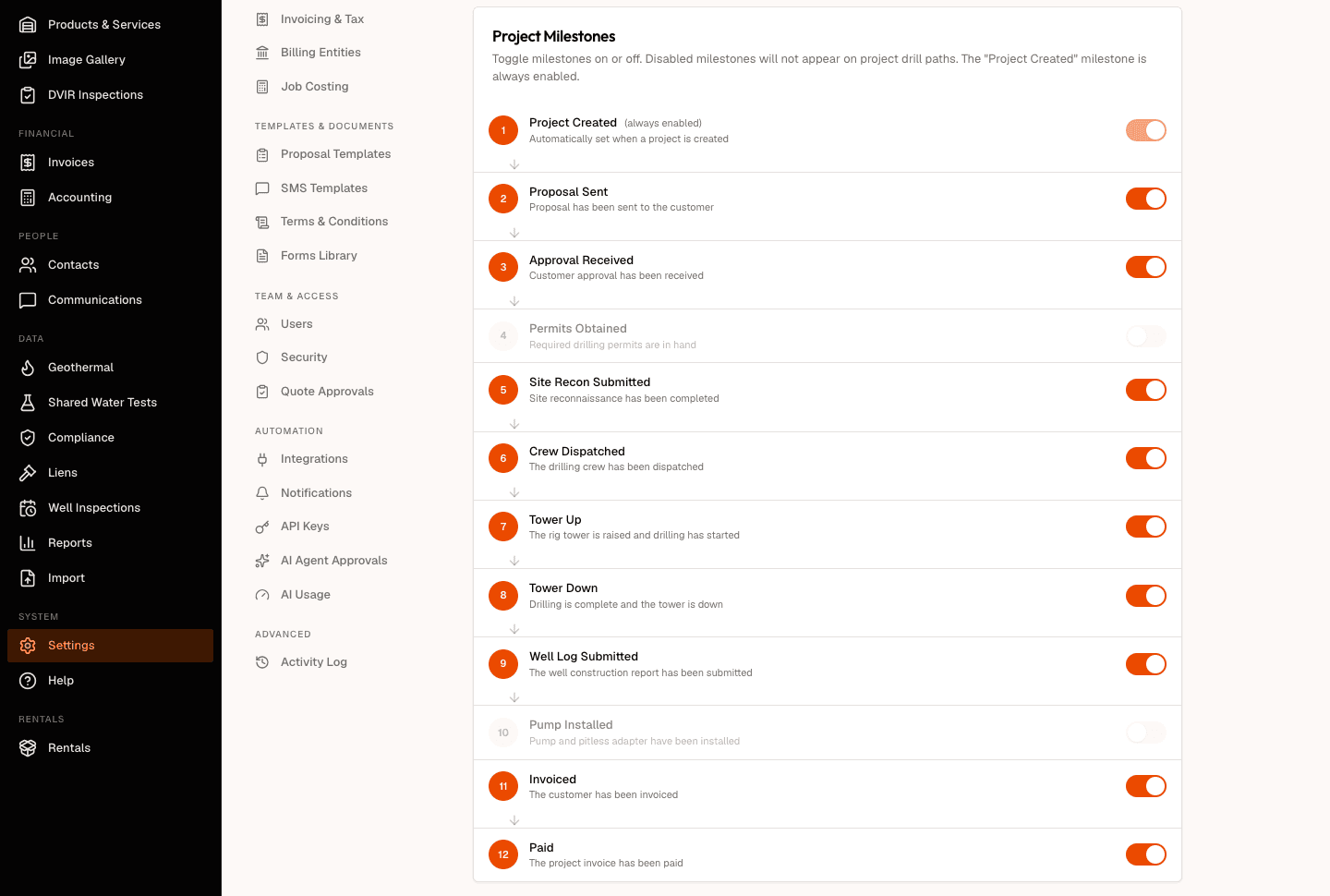
- Find the milestone you do not track.
- Click its toggle.
- Save.
Project Created is always on. Its row is marked "(always enabled)" and its toggle is locked, because a project that exists has been created and a path with no starting point reads as broken.
Reset Defaults switches every milestone back on and returns Permits to the Proposal stage. It only fills the form in, so click Save afterwards to keep it.
What turning one off actually does
A hidden milestone is gone from the strip on every project, and the numbers move with it.
- The percentage counts only what you can see. Hide a milestone and the total drops from twelve to eleven. Hide one that was already complete and it leaves the completed count too, so the percentage reflects the path you kept rather than the one you turned off.
- The next-action pill skips a hidden milestone. It points at the next step you actually track.
- A stage disappears when all of its milestones are hidden. Turn off Invoiced and Paid and the Completed heading goes with them, rather than leaving an empty stage on the strip.
- A milestone is hidden only when you have turned it off. A milestone your saved settings have never seen stays visible, so a step added to DrillerDB in a later release appears on your path without you coming back to this page for it.
Here is a project on the account whose settings appear above, with Permits Obtained and Pump Installed switched off. The strip carries ten steps rather than twelve, and the percentage is figured over those ten.

Step-by-Step: Move the Permits milestone
Plenty of crews pull permits a day or two before they drill, not back when the proposal goes out. The Permits Placement card, the first one on the page, decides where the step sits.
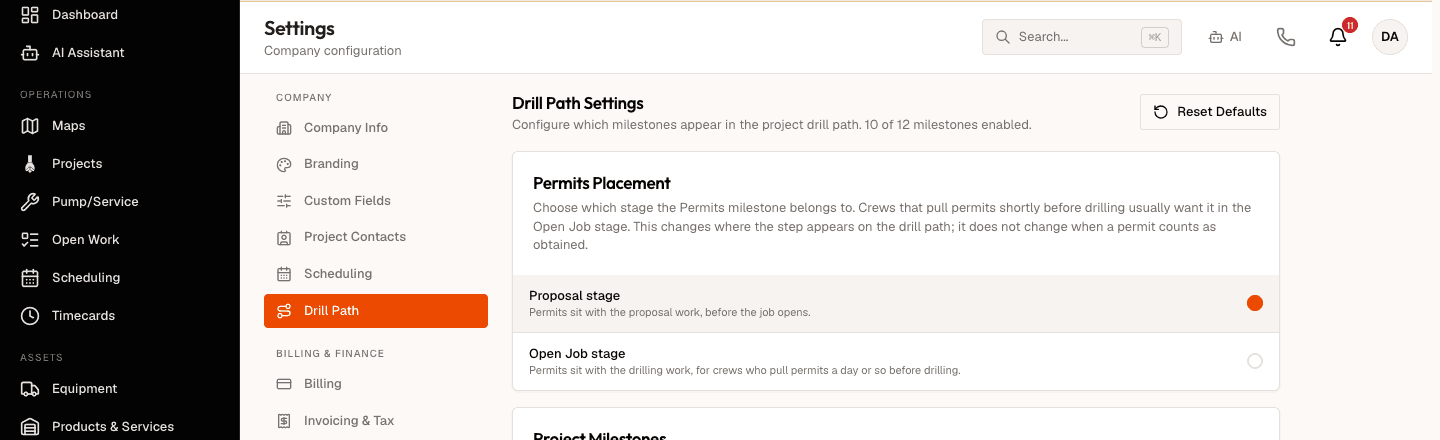
- Choose Proposal stage to leave Permits with the proposal work, before the job opens. This is the default.
- Choose Open Job stage to move Permits to the front of the Open Job stage, ahead of Site Recon.
- Save.
Moving Permits changes where the step appears on the drill path. It does not change when a permit counts as obtained, and it does not touch any permit record.
If Permits Obtained is turned off in Project Milestones, the milestone does not appear at all and the placement setting has nothing to move. Turning Permits back on brings it back in whichever stage you chose.
Tower Up waits for the crew
Tower Up completes when the crew records the tower event from the field app. It does not complete because a project reached the Open Job status.
Move a project to Open Job by hand and Tower Up stays pending until that tower event is recorded, which is the honest reading: the rig either went up or it did not, and the project status is not evidence either way.
Matching the two lists
The settings page and the drill path strip label the same milestone differently in places. The settings page uses the long form and the strip uses a short one that fits the path.
| On this settings page | On the drill path strip | Stage |
|---|---|---|
| Project Created | Created | Proposal |
| Proposal Sent | Send Proposal | Proposal |
| Approval Received | Approval | Proposal |
| Permits Obtained | Permits | Proposal, or Open Job if you move it |
| Site Recon Submitted | Site Recon | Open Job |
| Crew Dispatched | Dispatch | Open Job |
| Tower Up | Tower Up | Open Job |
| Tower Down | Tower Down | Open Job |
| Well Log Submitted | Well Log | Open Job |
| Pump Installed | Pump | Open Job |
| Invoiced | Invoice | Completed |
| Paid | Paid | Completed |
Related Topics
- DrillPath Milestones - the drill path itself and what each stage means.
- Milestone Tracking - how the strip advances as work happens.
- Proposal Milestones - what completes each milestone in the Proposal stage.
- Open Job Milestones - what completes each milestone during drilling.