
Payment Tracking
DrillerDB provides complete payment tracking to help you monitor cash flow and manage accounts receivable. This guide shows you how to record, track, and report on payments.
This page covers recording and monitoring payments on individual invoices. For the account-level view - A/R aging, statements, collections, and finance charges across all customers - use Accounting > Receivables.
Quick Start: Record a Payment
- Open the invoice
- Click Record Payment
- Enter amount and date
- Select payment method
- Save
Payment Dashboard
Viewing All Invoices
- Go to Invoices
- See overview showing:
| Summary | Description |
|---|---|
| Unpaid | Total outstanding |
| Overdue | Past due date |
| Paid This Month | Recent collections |
| Pending | Awaiting payment |
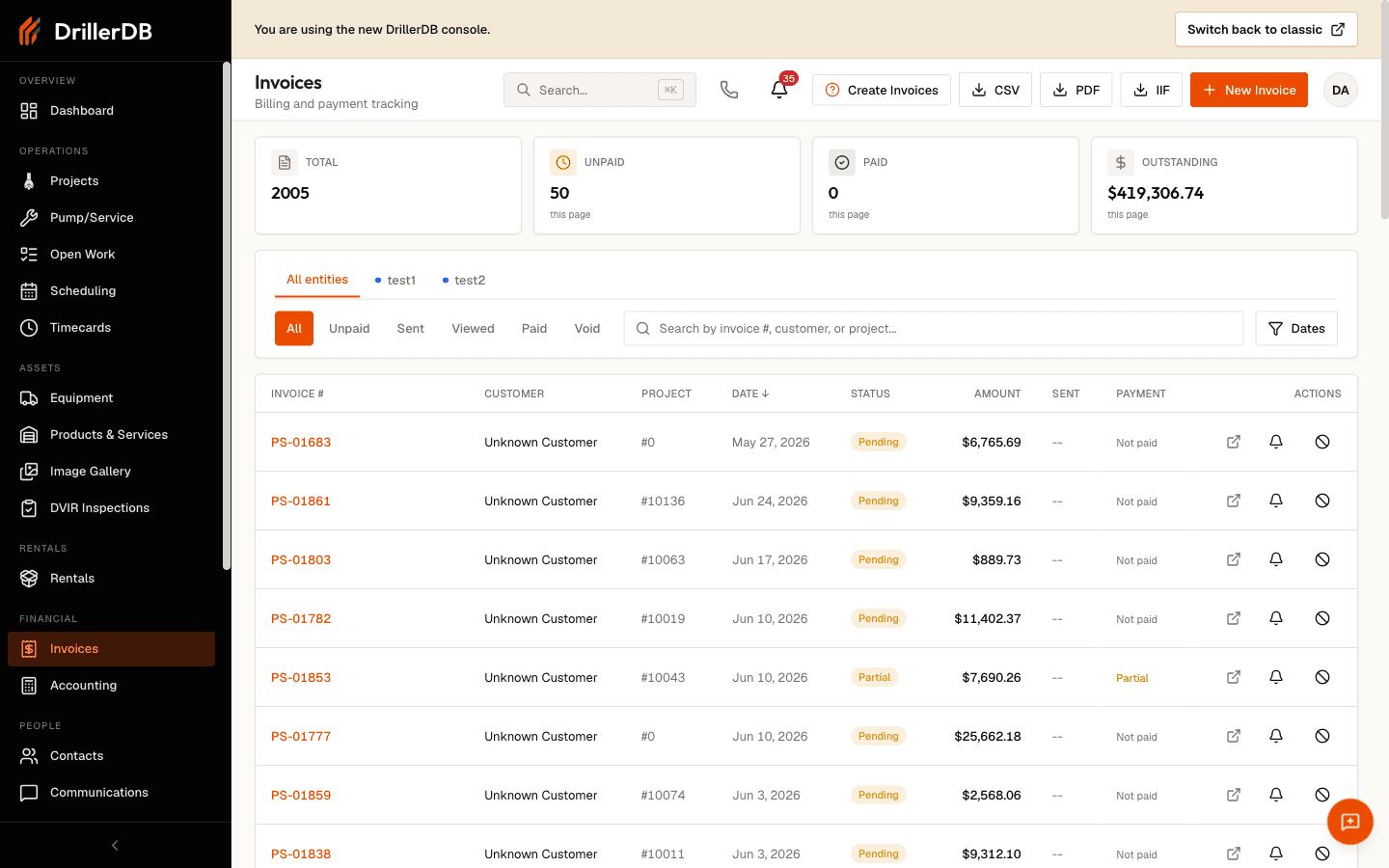
Filtering by Status
Click status buttons to filter:
| Status | Shows |
|---|---|
| All | Every invoice |
| Unpaid | Awaiting payment |
| Partial | Partially paid |
| Paid | Fully paid |
| Overdue | Past due |
Step-by-Step: Recording Payments
Step 1: Open the Invoice
- Go to Invoices
- Find the unpaid invoice
- Click to open
Step 2: Click Record Payment
- Click Record Payment button
- Payment form opens
- Invoice balance shown
Step 3: Enter Payment Details
| Field | Description |
|---|---|
| Amount | Payment received |
| Date | When received |
| Method | How it was paid |
| Reference | Check #, transaction ID |
| Notes | Additional details |
Step 4: Select Payment Method
| Method | When to Use |
|---|---|
| Credit Card | Online Stripe payment |
| ACH | Bank transfer |
| Check | Paper check |
| Cash | Cash payment |
| Wire | Bank wire transfer |
| Other | Other methods |
Step 5: Save Payment
- Review details
- Click Save
- Invoice status updates:
- Full payment → "Paid"
- Partial payment → "Partial"
Online payments via Stripe are recorded automatically. You only need to manually record offline payments.
Partial Payments
Recording Multiple Payments
- Record first payment
- Status changes to "Partial"
- Record additional payments as received
- Status changes to "Paid" when balance is zero
Viewing Balance
Open any invoice to see:
- Total invoice amount
- Payments received (list)
- Remaining balance
- Payment history
Example
| Invoice Total | $5,000 |
|---|---|
| Payment 1 | $2,500 |
| Payment 2 | $2,500 |
| Balance | $0 (Paid) |
Payment History
Viewing on Invoice
- Open invoice
- Scroll to Payments section
- See all payments with:
- Date
- Amount
- Method
- Reference
- Who recorded
Full Audit Trail
The activity log shows:
- When payment was recorded
- Who recorded it
- Method and reference
- Any notes added
Accounts Receivable Aging
Understanding Aging
| Bucket | Meaning |
|---|---|
| Current | Not yet due |
| 1-30 Days | 1-30 days overdue |
| 31-60 Days | 31-60 days overdue |
| 61-90 Days | 61-90 days overdue |
| 90+ Days | Over 90 days overdue |
Viewing Aging Report
- Go to Accounting > Receivables
- Open the AR Aging tab
- Set the As of date and click Run
- View the aging buckets, then click any customer to drill into their open invoices
See Accounting > Receivables for the full aging, statements, and collections workflow.
Using Aging for Collections
| Age | Recommended Action |
|---|---|
| Current | No action needed |
| 1-30 Days | Send reminder |
| 31-60 Days | Call customer |
| 61-90 Days | Escalate follow-up |
| 90+ Days | Consider collections |
Reporting
Payment Reports
Available reports:
| Report | Shows |
|---|---|
| Payments Received | All payments by date |
| Aging Summary | Outstanding by age |
| Customer Balances | Balance by customer |
| Collections | Overdue invoices |
Step-by-Step: Generate Report
- Go to Reports
- Select report type
- Set date range
- Filter by customer (optional)
- Click Generate
- Export to Excel or PDF
Key Metrics
Track these regularly:
| Metric | Meaning |
|---|---|
| Days Sales Outstanding | Average collection time |
| Collection Rate | % of invoices paid on time |
| Total Outstanding | All unpaid invoices |
| Overdue Amount | Past due total |
QuickBooks Sync
Automatic Sync
When QuickBooks is connected:
- Invoices sync to QuickBooks
- Payments sync both directions
- Customer records match
- No double entry needed
Manual Sync
If payment doesn't sync:
- Go to Settings > Integrations
- Click Sync Now
- Review sync log for errors
Refunds
Automated refund processing through DrillerDB is not currently available. Process refunds directly through your payment processor.
Processing Refunds via Stripe
- Log into your Stripe Dashboard
- Find the payment to refund
- Click Refund on the payment
- Enter refund amount
- Confirm the refund
Stripe Refund Notes:
- Returns to original payment method
- Processing fee refunded for full refunds
- Card refunds: 5-10 business days
- ACH refunds: 3-5 business days (180-day limit)
Manual Refunds:
- Issue check or other payment directly
- Keep records for accounting reconciliation
Troubleshooting
Payment not recording?
- Check you have billing permissions
- Verify amount doesn't exceed balance
- Try refreshing the page
Invoice still showing unpaid?
- Payment may be partial
- Check payment history
- Verify amount recorded correctly
QuickBooks not syncing?
- Check connection status
- Review sync error log
- Manually sync if needed
Can't find payment?
- Check correct invoice
- Review payment history
- Search by reference number
Related Topics
- Creating Invoices - Invoice creation
- Stripe Payments - Online payments
- Invoice Reminders - Follow-up
- QuickBooks Integration - Accounting sync