
Here is what changed in DrillerDB in October. Everything below is live now, in the office app at console.drillerdb.com and in the field app.
Wells
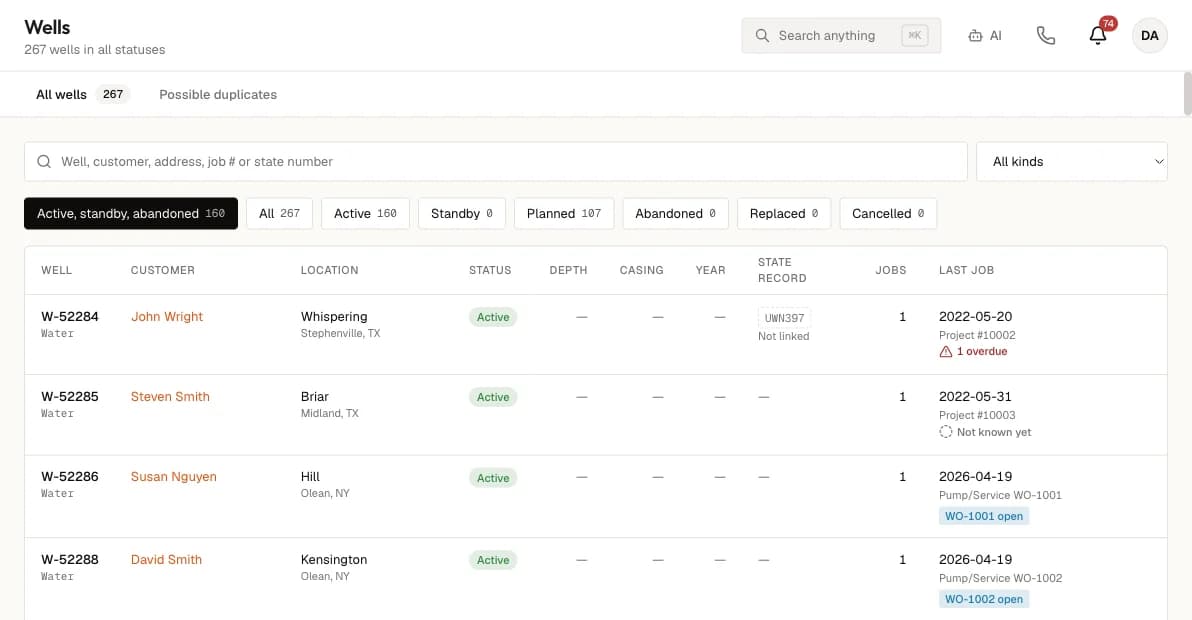
- A new Wells page lists every customer well with its status, state record and last job. Each well has its own page, and each customer has a Wells tab.
- Start a service job, an inspection, a reconstruction or a replacement straight from a well.
- On a Pump/Service job, the Pump tab shows the well's earlier pump record from another job, and Update starts a new Pump Log with that equipment filled in.
Scheduling
- The day-before reminder email now has a Confirm my visit button. When the customer confirms, the job shows "Customer confirmed" and the calendar shows a check mark.
- Mark one visit done while the job stays open, and add a follow-up visit to the same job.
Invoices
- Mark as Sent records an invoice you printed, mailed or handed to the customer yourself, so it no longer reads "Not sent". It is on the invoice page, on a job's Invoices tab and on the Invoices list.
- Send Invoice now stops when the job has no Bill To customer, so an invoice cannot go out with nobody on it.
Field app and crews
- In field app 2.0.7, crews can pick service items and prices from your Products & Services catalog on a work order.
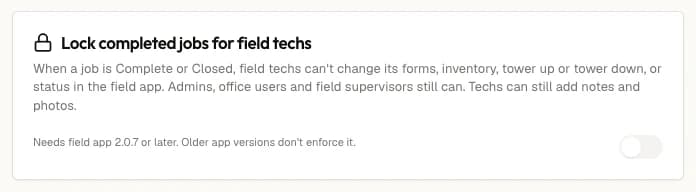
- A new setting, Lock completed jobs for field techs: once a job is Complete or Closed, techs cannot change it in the field app. Admins, office users and field supervisors still can.
- Field supervisors can now use the office screens, the same as an office user, and can still be scheduled on jobs. Users, security, integrations and modules stay admin-only.
Questions about any of these? Email support@drillerdb.com, or read the help guides.